Hmmmm. Perusing emu/debug/debugcpu.cpp we find the elusive wpdata.
struct debugcpu_private
{
...
UINT64 wpdata;
UINT64 wpaddr;
UINT64 tempvar[NUM_TEMP_VARIABLES];
osd_ticks_t last_periodic_update_time;
bool comments_loaded;
};
//-------------------------------------------------
// watchpoint_check - check the watchpoints
// for a given CPU and address space
//-------------------------------------------------
void device_debug::watchpoint_check(address_space &space, int type, offs_t address, UINT64 value_to_write, UINT64 mem_mask)
...
// if we are a write watchpoint, stash the value that will be written
global->wpaddr = address;
if (type & WATCHPOINT_WRITE)
global->wpdata = value_to_write;
...
but there's no corresponding code to modify global->wpdata for WATCHPOINT_READ for just reading values so it doesn't get updated for reads.
Thursday, February 25, 2016

Watchpoint data reads don't seem to display the right data for wpdata
I thought I'd add some "memory snooping" to my trace to see what is read and written and upon close inspection the wpdata doesn't seem to display correctly.
WP 9800,200,rw,1,{tracelog " addr=%x data=%x ", wpaddr,wpdata;g}
trace >>mytrace.txt,0,{tracelog "A=%02X EA=%04X HL=%04X DE=%04X BC=%04X SKIP=%1X 9937=%02X | ",a,ea,hl,de,bc,(psw&0x20)!=0,pb@9937}
which generates this:
A=68 EA=0078 HL=2D00 DE=8007 BC=0080 SKIP=0 9937=76 | 221B: CALL $2205
A=68 EA=0078 HL=2D00 DE=8007 BC=0080 SKIP=0 9937=76 | 2205: LBCD $9939
addr=9939 data=1E addr=993A data=1E
A=68 EA=0078 HL=2D00 DE=8007 BC=9A79 SKIP=0 9937=76 | 2209: LXI EA,$9DA9
A=68 EA=9DA9 HL=2D00 DE=8007 BC=9A79 SKIP=0 9937=76 | 220C: DGT EA,BC
A=68 EA=9DA9 HL=2D00 DE=8007 BC=9A79 SKIP=1 9937=76 | 220E: RET
A=68 EA=9DA9 HL=2D00 DE=8007 BC=9A79 SKIP=0 9937=76 | 220F: RETS
A=68 EA=9DA9 HL=2D00 DE=8007 BC=9A79 SKIP=1 9937=76 | 221E: CALT ($0096)
A=68 EA=9DA9 HL=2D00 DE=8007 BC=9A79 SKIP=0 9937=76 | 221F: ANIW VV:03,$7F
addr=9803 data=1E addr=9803 data=8
A=68 EA=9DA9 HL=2D00 DE=8007 BC=9A79 SKIP=0 9937=76 | 2222: LXI HL,$9901
A=68 EA=9DA9 HL=9901 DE=8007 BC=9A79 SKIP=0 9937=76 | 2225: LDEAX (HL)
addr=9901 data=8 addr=9902 data=8
A=68 EA=0000 HL=9901 DE=8007 BC=9A79 SKIP=0 9937=76 | 2227: LDED $993B
addr=993B data=8 addr=993C data=8
A=68 EA=0000 HL=9901 DE=0078 BC=9A79 SKIP=0 9937=76 | 222B: DADD EA,DE
A=68 EA=0078 HL=9901 DE=0078 BC=9A79 SKIP=0 9937=76 | 222D: STEAX (HL)
addr=9901 data=78 addr=9902 data=0
A=68 EA=0078 HL=9901 DE=0078 BC=9A79 SKIP=0 9937=76 | 222F: OFFIW VV:09,$10
addr=9809 data=0
A=68 EA=0078 HL=9901 DE=0078 BC=9A79 SKIP=1 9937=76 | 2232: ORIW VV:11,$10
A=68 EA=0078 HL=9901 DE=0078 BC=9A79 SKIP=0 9937=76 | 2235: OFFIW VV:08,$20
addr=9808 data=0
A=68 EA=0078 HL=9901 DE=0078 BC=9A79 SKIP=1 9937=76 | 2238: ORIW VV:11,$08
A=68 EA=0078 HL=9901 DE=0078 BC=9A79 SKIP=0 9937=76 | 223B: LXI HL,$9808
A=68 EA=0078 HL=9808 DE=0078 BC=9A79 SKIP=0 9937=76 | 223E: LDEAX (HL)
if you look at the 221F: ANIW VV:03,$7F the first one should be the read, 9803 data=1E, AND with $7F then ends up writing 9803 data=8.
That can't be right. It looks like the wpdata doesn't get updated for a read, instead displaying the wpdata for the last value that was written.
LDED $9938 loads DE=0078 but it wpdata says it read the values 8 and 8.
Tuesday, February 23, 2016
click selects all in firefox with ubuntu
I use firefox under ubuntu and windows and one thing that is different is that a single click in the Location (URL) bar will select everything in windows, but the linux version will require a doubleclick.
So a little searching brought up this page:
http://www.askvg.com/hack-single-click-select-all-feature-in-mozilla-firefox-addressbar/
Bringing up about:config searching on "selects", a couple of right click and "toggle"s
and harmony in the universe is restored.
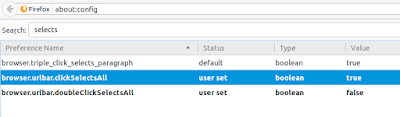
So a little searching brought up this page:
http://www.askvg.com/hack-single-click-select-all-feature-in-mozilla-firefox-addressbar/
Bringing up about:config searching on "selects", a couple of right click and "toggle"s
and harmony in the universe is restored.

Monday, February 22, 2016
Trying to get displaylink working under ubuntu - yay
Just for fun, I thought I'd see if my displaylink usb adapters would work under ubuntu 14.04. Sadly, after plugging it in it seems to have a lot of flashing led activity and ubuntu acts like it's aware of another monitor. However, the screen never comes up and the mouse gets very slow and stuttery.
I tried upgrading the kernel to the LTS Enablement, but it didn't make any difference.
https://wiki.ubuntu.com/Kernel/LTSEnablementStack
I even tried the drivers from displaylink's website.
http://support.displaylink.com/knowledgebase/articles/684649-how-to-install-displaylink-software-on-ubuntu
I would love for it to work, but it just doesn't.... sigh... At least I can do dual monitors on the Optiplex 760 on the internal graphics with no problem.
edit: IT WORKS!!!! IT'S ALIVE!!!
I just needed to reboot, and after plugging in the displaylink usb, it didn't have the led flicker storm as before. I was able to easily turn on the display in system settings/display and it comes up beautifully. Hooray!
The only strange issue is that the launcher bar won't show up on one of the screens, even if I specify that the launcher bar is on all screens.
Triple monitor goodness AT LAST!
Sunday, February 21, 2016
Driving the cr stepper motor
$C008 is where the action happens for driving the cr (carriage) stepper motor.
so running 'grep "$C008" ap2k_disasm' gives me
~/Downloads/mame$ grep '$C008' ap2k_disasm
000077B6: 70 79 08 C0 MOV ($C008),A
000077CE: 70 79 08 C0 MOV ($C008),A
00007851: 70 69 08 C0 MOV A,($C008)
00007B51: 70 69 08 C0 MOV A,($C008)
00007B5A: 70 79 08 C0 MOV ($C008),A
00007B5F: 70 79 08 C0 MOV ($C008),A
so we'll investigate these addresses.

Here it looks like some setup code around $77B4 writing zeroes to $C008 and then eventually initializing $C008 with $0d.
There's a table base address that gets put into $991D and $991E with LXI HL, $7B76 (load HL with the immediate value $7B76) and SHLD $991d (store HL direct to memory)

This table gets used later where at $7B4D, we LHLD $991D, which gets the base address of the table.
We get the current phase and put it into A with MOV A,($C008)
then LDAX (HL+A) gets the value for the next phase
and MOV ($C008),A writes it into $C008.
But if you look closely at our table at $7B66 and $7B76 the values look strange and the sequence is different.

The sequence runs for $7B66:
D5FBE6C8D
and for the reverse direction at $7B76:
D8C6EBF5D
and if you look at the code in e05a30.cpp, there's a difference: there's a SLA7020M that is actually driving the cr stepper. So we translate to the format that the SLA7020M wants.

So for fun I wanted to see exactly what this function would output: (hope this hilite.me thing works)
~/Downloads/mame$ cc test_cr_sla_works.c
~/Downloads/mame$ ./a.out
translating 0 to 15
0 0
1 0
2 0
3 0
4 2
5 1
6 2
7 1
8 8
9 8
a 4
b 4
c a
d 9
e 6
f 5
translating D5FBE6C8D:
D 13 -> 9
5 5 -> 1
F 15 -> 5
B 11 -> 4
E 14 -> 6
6 6 -> 2
C 12 -> a
8 8 -> 8
D 13 -> 9
translating D8C6EBF5D:
D 13 -> 9
8 8 -> 8
C 12 -> a
6 6 -> 2
E 14 -> 6
B 11 -> 4
F 15 -> 5
5 5 -> 1
D 13 -> 9
and sure enough, this matches the sequence for the regular "NOT_A_REEL" stepper motor once filtered through the cr_sla7020m function.
so running 'grep "$C008" ap2k_disasm' gives me
~/Downloads/mame$ grep '$C008' ap2k_disasm
000077B6: 70 79 08 C0 MOV ($C008),A
000077CE: 70 79 08 C0 MOV ($C008),A
00007851: 70 69 08 C0 MOV A,($C008)
00007B51: 70 69 08 C0 MOV A,($C008)
00007B5A: 70 79 08 C0 MOV ($C008),A
00007B5F: 70 79 08 C0 MOV ($C008),A
so we'll investigate these addresses.
Here it looks like some setup code around $77B4 writing zeroes to $C008 and then eventually initializing $C008 with $0d.
There's a table base address that gets put into $991D and $991E with LXI HL, $7B76 (load HL with the immediate value $7B76) and SHLD $991d (store HL direct to memory)
This table gets used later where at $7B4D, we LHLD $991D, which gets the base address of the table.
We get the current phase and put it into A with MOV A,($C008)
then LDAX (HL+A) gets the value for the next phase
and MOV ($C008),A writes it into $C008.
But if you look closely at our table at $7B66 and $7B76 the values look strange and the sequence is different.
The sequence runs for $7B66:
D5FBE6C8D
and for the reverse direction at $7B76:
D8C6EBF5D
and if you look at the code in e05a30.cpp, there's a difference: there's a SLA7020M that is actually driving the cr stepper. So we translate to the format that the SLA7020M wants.
So for fun I wanted to see exactly what this function would output: (hope this hilite.me thing works)
#include <stdio.h>
#include <string.h>
typedef int bool;

#define BIT(data,bit) (data&(1<<bit))

static int cr_sla7020m(int data)
{
	bool ina = BIT(data, 0);
	bool inb = BIT(data, 1);
	bool tda = BIT(data, 2);
	bool tdb = BIT(data, 3);
	bool outa0 =  ina && tda;
	bool outa1 = !ina && tda;
	bool outb0 =  inb && tdb;
	bool outb1 = !inb && tdb;
	return (outb1<<3)|(outb0<<2)|(outa1<<1)|(outa0<<0);
}


int hexchar2int(thischar){
if (thischar >= '0' && thischar <= '9') return thischar - '0';
else if (thischar >= 'A' && thischar <= 'F') return thischar - 'A'+10;
else printf("woo hoo");
}


void main (int argc, char *argv[]){

int i;
printf("translating 0 to 15\n");
for (i=0;i<16;i++) printf("%x %x\n",i,cr_sla7020m(i));


char * dostr = "D5FBE6C8D";
printf ("translating %s:\n",dostr);
for (i=0;i<strlen(dostr);i++){printf("%c %d -> %x \n",dostr[i],hexchar2int(dostr[i]),cr_sla7020m(hexchar2int(dostr[i])));}

char * dostr2 = "D8C6EBF5D";
printf ("translating %s:\n",dostr2);
for (i=0;i<strlen(dostr2);i++){printf("%c %d -> %x\n",dostr2[i],hexchar2int(dostr2[i]),cr_sla7020m(hexchar2int(dostr2[i])));}


}
~/Downloads/mame$ cc test_cr_sla_works.c
~/Downloads/mame$ ./a.out
translating 0 to 15
0 0
1 0
2 0
3 0
4 2
5 1
6 2
7 1
8 8
9 8
a 4
b 4
c a
d 9
e 6
f 5
translating D5FBE6C8D:
D 13 -> 9
5 5 -> 1
F 15 -> 5
B 11 -> 4
E 14 -> 6
6 6 -> 2
C 12 -> a
8 8 -> 8
D 13 -> 9
translating D8C6EBF5D:
D 13 -> 9
8 8 -> 8
C 12 -> a
6 6 -> 2
E 14 -> 6
B 11 -> 4
F 15 -> 5
5 5 -> 1
D 13 -> 9
and sure enough, this matches the sequence for the regular "NOT_A_REEL" stepper motor once filtered through the cr_sla7020m function.
Saturday, February 20, 2016
Driving the pf stepper motor in ap2000
I like to skip around when I get stuck... so I happened upon some code that looks like where it drives the pf (paper feed) stepper motor. It's actually a pretty simple fragment.
Fragments like this are so simple and elegant.

It checks the high bit of $9801 and sets the base address of the stepper table in HL.
So one table at $3289 for one direction, and another at $3293 for the other direction. To save a couple of bytes, they overlapped the tables a little bit.


Then we get the current phase at $C007, and look up the next phase with LDAX (HL+A).
We save a copy in B, write the new phase to $C007.
The we look up another phase, wait a couple of cycles and write that phase and return.

so if we're at phase 1, the next will be 5

if we are at 5 the next will be 4

Starting at 1, this will generate the sequence 1 5 4 6 2 A 8 9 1... and backwards for the other direction which matches the sequence for NOT_A_REEL in steppers.cpp.


Fragments like this are so simple and elegant.
It checks the high bit of $9801 and sets the base address of the stepper table in HL.
So one table at $3289 for one direction, and another at $3293 for the other direction. To save a couple of bytes, they overlapped the tables a little bit.
Then we get the current phase at $C007, and look up the next phase with LDAX (HL+A).
We save a copy in B, write the new phase to $C007.
The we look up another phase, wait a couple of cycles and write that phase and return.
so if we're at phase 1, the next will be 5
if we are at 5 the next will be 4
Starting at 1, this will generate the sequence 1 5 4 6 2 A 8 9 1... and backwards for the other direction which matches the sequence for NOT_A_REEL in steppers.cpp.
Friday, February 19, 2016
Ethernet comes up after every other suspend with Ubuntu 14.04
I've got this Optiplex 760 that I'm using with Ubuntu 14.04 and it's running really nicely. Ubuntu is a pretty slick setup and it works well and is very reliable.
But there's one thing that's driving me bats: My ethernet adapter disappears after every other suspend, forcing me to suspend again to bring it back.
I don't see that there's anything esoteric about my hardware, and it works fine once it comes back. Weird.
lspci
00:00.0 Host bridge: Intel Corporation 4 Series Chipset DRAM Controller (rev 03)
00:02.0 VGA compatible controller: Intel Corporation 4 Series Chipset Integrated Graphics Controller (rev 03)
00:02.1 Display controller: Intel Corporation 4 Series Chipset Integrated Graphics Controller (rev 03)
00:03.0 Communication controller: Intel Corporation 4 Series Chipset HECI Controller (rev 03)
00:03.2 IDE interface: Intel Corporation 4 Series Chipset PT IDER Controller (rev 03)
00:03.3 Serial controller: Intel Corporation 4 Series Chipset Serial KT Controller (rev 03)
00:19.0 Ethernet controller: Intel Corporation 82567LM-3 Gigabit Network Connection (rev 02)
00:1a.0 USB controller: Intel Corporation 82801JD/DO (ICH10 Family) USB UHCI Controller #4 (rev 02)
00:1a.1 USB controller: Intel Corporation 82801JD/DO (ICH10 Family) USB UHCI Controller #5 (rev 02)
00:1a.2 USB controller: Intel Corporation 82801JD/DO (ICH10 Family) USB UHCI Controller #6 (rev 02)
00:1a.7 USB controller: Intel Corporation 82801JD/DO (ICH10 Family) USB2 EHCI Controller #2 (rev 02)
00:1b.0 Audio device: Intel Corporation 82801JD/DO (ICH10 Family) HD Audio Controller (rev 02)
00:1c.0 PCI bridge: Intel Corporation 82801JD/DO (ICH10 Family) PCI Express Port 1 (rev 02)
00:1c.1 PCI bridge: Intel Corporation 82801JD/DO (ICH10 Family) PCI Express Port 2 (rev 02)
00:1d.0 USB controller: Intel Corporation 82801JD/DO (ICH10 Family) USB UHCI Controller #1 (rev 02)
00:1d.1 USB controller: Intel Corporation 82801JD/DO (ICH10 Family) USB UHCI Controller #2 (rev 02)
00:1d.2 USB controller: Intel Corporation 82801JD/DO (ICH10 Family) USB UHCI Controller #3 (rev 02)
00:1d.7 USB controller: Intel Corporation 82801JD/DO (ICH10 Family) USB2 EHCI Controller #1 (rev 02)
00:1e.0 PCI bridge: Intel Corporation 82801 PCI Bridge (rev a2)
00:1f.0 ISA bridge: Intel Corporation 82801JD (ICH10D) LPC Interface Controller (rev 02)
00:1f.2 SATA controller: Intel Corporation 82801JD/DO (ICH10 Family) SATA AHCI Controller (rev 02)
00:1f.3 SMBus: Intel Corporation 82801JD/DO (ICH10 Family) SMBus Controller (rev 02)
uname -r
3.19.0-47-generic
Subscribe to:
Posts (Atom)