I wanted knoppix 7.6 to tune channel 3 on my bt848 card on /dev/video0 but it wouldn't tune properly.
So I tried everything I could think of.
but I looked at the parameter list after clicking on advanced options and it needed a space before :v4l2-tuner-frequency=61250
61250 khz = 61.25 mhz for channel 3 which will tune my analog cable box DTA.
so this line doesn't work:
:v4l2-standard=NTSC:v4l2-tuner-frequency=61250 DOESN'T WORK
and this line does work:
:v4l2-standard=NTSC :v4l2-tuner-frequency=61250 WORKS
so you just have to manually add the space and it works.
Friday, September 30, 2016

Thursday, September 29, 2016
Ubuntu sound is problematic with my analog tv cards
I thought I'd try ubuntu 16.04 on a system that I'd been using with knoppix and I am getting extremely frustrated.
I launch tvtime or vlc and I just can't get the sound working at all from my brooktree 848 capture cards. I actually have two bt848 installed in this system.
I installed pavucontrol and I can see that there's some audio flickering on the meter but I just can't hear it.
With knoppix, everything just works with regards to the audio, and now I am so totally baffled.
I think I better do something else for awhile...I can see why people use windows.
There's video from /dev/video0 and /dev/video1 but just no sound.
I launch tvtime or vlc and I just can't get the sound working at all from my brooktree 848 capture cards. I actually have two bt848 installed in this system.
I installed pavucontrol and I can see that there's some audio flickering on the meter but I just can't hear it.
With knoppix, everything just works with regards to the audio, and now I am so totally baffled.
I think I better do something else for awhile...I can see why people use windows.
There's video from /dev/video0 and /dev/video1 but just no sound.
Monday, September 26, 2016
Built-in editor for microcontroller kit
I'm having a great deal of fun trying to figure out the ins and outs of the Thames and Kosmos microcontroller kit.
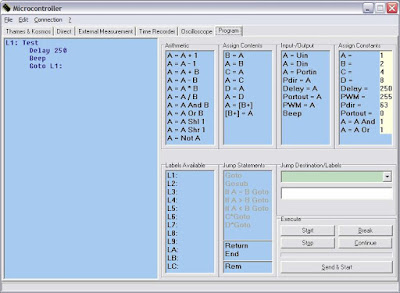
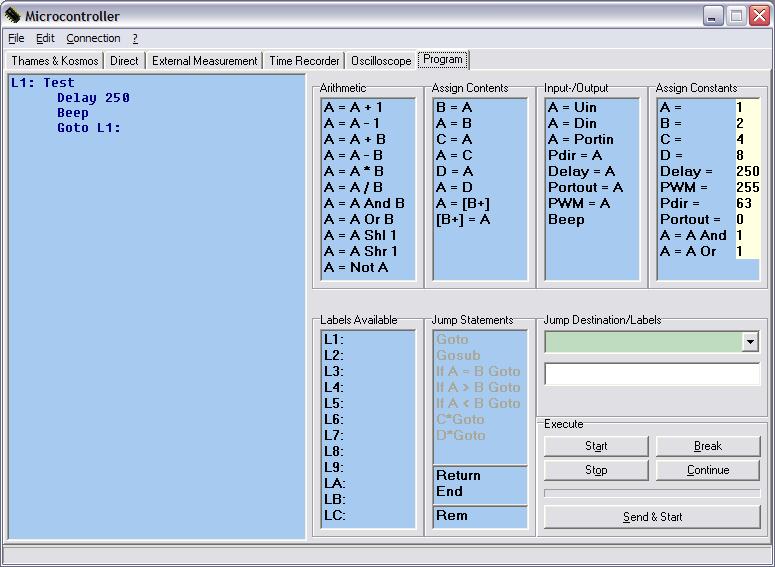
I wrote my first program(s) using the built-in editor and I have to say that it's a little bit restrictive. For instance, you have to double click on an instruction (or drag it into the program pane) to add it to the program.
Once you've put it in, you can't edit it in any way except to delete it. No copy/paste, or changing a numeric constant.
So to enter an instruction like Delay = 250, first you have to set the constant to 250, then double click on the Delay instruction.
I did notice that all of the sample programs have the suffix .k and they are all text files. One should be able to edit a text file and load it into the editor. It seems that labels have no indentation, and regular instruction have a TAB at the beginning of the line.
The initial program upon first launching the editor software had the line Delay 250, but I could only enter the instruction Delay = 250, so that must have been loaded from a text file.
I wrote my first program(s) using the built-in editor and I have to say that it's a little bit restrictive. For instance, you have to double click on an instruction (or drag it into the program pane) to add it to the program.
Once you've put it in, you can't edit it in any way except to delete it. No copy/paste, or changing a numeric constant.
So to enter an instruction like Delay = 250, first you have to set the constant to 250, then double click on the Delay instruction.
I did notice that all of the sample programs have the suffix .k and they are all text files. One should be able to edit a text file and load it into the editor. It seems that labels have no indentation, and regular instruction have a TAB at the beginning of the line.
The initial program upon first launching the editor software had the line Delay 250, but I could only enter the instruction Delay = 250, so that must have been loaded from a text file.
Saturday, September 24, 2016
Thames and Kosmos Microcontroller kit
My latest toy is a Thames and Kosmos Microcontroller kit. This is great fun. I think it's discontinued and I got this second hand. It only seems to be missing one of the transistors but I don't think that's a show stopper.
So far I've put it together and hooked up the first test. You have to assemble the pieces into the case, pressing the little clips into place, and placing the potentiometer, the microphone, the piezo and hooking up the power connections.
There's a lot of connections to be made in the diagram for the first test and I missed a couple. I actually missed a critical one and the test wouldn't run as it didn't have the pins connected pins on the microcontroller between 5v and start.
Then I got some of the LEDs installed backwards, and finally I realized how you can tell polarity: there's a small flat spot on the side of the LED. It's subtle but if you look closely it's there.
Once everything is hooked up properly, the LEDs will light in sequence, the first LED's brightness will be controlled by a light sensor, and the rate of the LED sequence is controlled by the same light sensor (bright makes it slow, dark makes it fast) and if you press on a clip switch, the piezo will beep and freeze the light sequence. Pretty cool.
Thankfully, there's a 9v barrel plug so I don't have to use batteries but it's left to you to find an appropriate power supply (after about a half hour I located something that would work in all of my electronic stuff).
Great fun, so far I'm having a blast.

So far I've put it together and hooked up the first test. You have to assemble the pieces into the case, pressing the little clips into place, and placing the potentiometer, the microphone, the piezo and hooking up the power connections.
There's a lot of connections to be made in the diagram for the first test and I missed a couple. I actually missed a critical one and the test wouldn't run as it didn't have the pins connected pins on the microcontroller between 5v and start.
Then I got some of the LEDs installed backwards, and finally I realized how you can tell polarity: there's a small flat spot on the side of the LED. It's subtle but if you look closely it's there.
Once everything is hooked up properly, the LEDs will light in sequence, the first LED's brightness will be controlled by a light sensor, and the rate of the LED sequence is controlled by the same light sensor (bright makes it slow, dark makes it fast) and if you press on a clip switch, the piezo will beep and freeze the light sequence. Pretty cool.
Thankfully, there's a 9v barrel plug so I don't have to use batteries but it's left to you to find an appropriate power supply (after about a half hour I located something that would work in all of my electronic stuff).
Great fun, so far I'm having a blast.

Friday, September 23, 2016
I wish VLC would allow "fit to window" stretching
I hate black borders around video. I'd rather have the image stretched to fill the window. Instead, VLC and tvtime want to enforce aspect ratios. It'd be nice if there was an option to "relax" this aspect ratio enforcement.
I don't mind a little image distortion here and there, I've gotten used to the 4:3 to 16:9 stretching on my TV.
I don't mind a little image distortion here and there, I've gotten used to the 4:3 to 16:9 stretching on my TV.
VLC command line for bringing up the analog TV card
I thought I'd figure out how to get VLC started and playing from my analog TV brooktree 848 card.
The command line that works for me is:
vlc v4l2:///dev/video0 --v4l2-standard NTSC --live-caching 0 &
I like the ampersand at the end to run it in the background and keep the terminal window active.
https://wiki.videolan.org/Documentation:Modules/v4l2/
http://askubuntu.com/questions/527482/is-it-really-possible-to-set-up-vlc-to-stream-tv-from-tv-tuner-card-encore-enlt
I had to do this because it was too complicated for family members (who will go nameless) to bring up the dialogs and to do it manually.
It's amazing how just the smallest complexity can stump people.
When we had to switch to Digital Television Converter Boxes, the additional complexity of having a DTV box that broadcasts on channel 3 would completely baffle an unnamed family member. And the DTV box that has its own volume control in addition to the TVs own volume control.
They liked it when there was no complexity: you turn it on and it works. They weren't keen on having two remotes either: one remote for the TV, and one for the DTV box.
I was really glad when we found a TV (I think it was a Funai) that when plugged in would come up on channel 3 ready to go, so we could hide the TV remote.
It's the same reason why people like automatic transmissions: they just put their foot on the gas and the car goes. They don't want the trouble of having to switch gears themselves and the learning curve that goes with that.
The command line that works for me is:
vlc v4l2:///dev/video0 --v4l2-standard NTSC --live-caching 0 &
I like the ampersand at the end to run it in the background and keep the terminal window active.
https://wiki.videolan.org/Documentation:Modules/v4l2/
http://askubuntu.com/questions/527482/is-it-really-possible-to-set-up-vlc-to-stream-tv-from-tv-tuner-card-encore-enlt
I had to do this because it was too complicated for family members (who will go nameless) to bring up the dialogs and to do it manually.
It's amazing how just the smallest complexity can stump people.
When we had to switch to Digital Television Converter Boxes, the additional complexity of having a DTV box that broadcasts on channel 3 would completely baffle an unnamed family member. And the DTV box that has its own volume control in addition to the TVs own volume control.
They liked it when there was no complexity: you turn it on and it works. They weren't keen on having two remotes either: one remote for the TV, and one for the DTV box.
I was really glad when we found a TV (I think it was a Funai) that when plugged in would come up on channel 3 ready to go, so we could hide the TV remote.
It's the same reason why people like automatic transmissions: they just put their foot on the gas and the car goes. They don't want the trouble of having to switch gears themselves and the learning curve that goes with that.
Friday, September 16, 2016
I've grown to really like subtitles
I have grown accustomed to watching movies with subtitles always turned on. I think it takes some of the cognitive load off from having to listen closely to the dialogue. In some movies the characters talk softly and you can't understand what they're saying half of the time.
I get upset when I get a dvd that doesn't have subtitles in English. It'd be neat to have the movies subtitled on movies shown on in-flight entertainment. Often they'll have sustitles in foreign languages but not English. I don't care if the movie is already in English, give me English subtitles too!
I get upset when I get a dvd that doesn't have subtitles in English. It'd be neat to have the movies subtitled on movies shown on in-flight entertainment. Often they'll have sustitles in foreign languages but not English. I don't care if the movie is already in English, give me English subtitles too!
Subscribe to:
Posts (Atom)