Monday, October 8, 2018
Getting my Analog TV card to work in Ubuntu 18.04
I got a couple of old Analog TV cards and thought I'd chuck 'em into a Ubuntu 18.04 box and see if I could get TV to work.
Ubuntu finds them just fine, one's a BT878 [109e:036e] and the other is a CX23880/1/2/3 [14f1:8800].
I usually get VLC to open up the TV card to see if it's working:
vlc v4l2:///dev/video0 :v4l2-standard=NTSC :v4l2-tuner-frequency=61250 --crop 16:9 :live-caching=0 --zoom 2.2 --aspect-ratio 16:9
looks pretty decent since I'm getting the analog cable signal on channel 3 from the DTV adapter.
but the first video card on /dev/video0 seems to be getting a lot of interference and it looks terrible with hum bars all over the place.
Let's try the other video card on /dev/video1
vlc v4l2:///dev/video1 :v4l2-standard=NTSC :v4l2-tuner-frequency=61250 --crop 16:9 :live-caching=0 --zoom 2.2 --aspect-ratio 16:9
The video looks great, no interference, but now we've got another problem: only the top half of the tv screen is showing...I don't know why.
so let's try tvtime (which can be installed with "sudo apt install tvtime")
and it looks pretty good with:
tvtime -d /dev/video1 -c 3 -M -g 1920x1080
This looks pretty decent: -c 3 gets channel 3 -M is windowed and -g 1920x1080 gives me a window that fills my monitor.
So the video is fine, what about sound?
For some reason, the audio quality with tvtime stutters all over the place. So let's try using the Line-out from the TV card and piping that to the line-in of the onboard sound card.
But you go to the Ubuntu sound control panel and you can't get the line in stuff to work.
I installed pavucontrol with "sudo apt install pavucontrol" and running pavucontrol didn't help me fix it.
I had to issue this command:
pacmd load-module module-loopback
which is a bunch of pulse audio voodoo to pump the sound card line in to the sound card output.
If this seems wayyy too hard, it is. Getting stuff like this to work in Windows is so simple. I can see why people get frustrated with linux. You just go to sound properties and monitor the line out with two clicks.
Everything works pretty smoothly, but I have problems after I go into standby. When I come back out of standby the tvtime window is all screwed up with funky patterns instead of the video. I have to close tvtime, launch vlc and then reload tvtime.
So after I come out of standby I run this command: It launches vlc to init my /dev/video1, drops out after 2 seconds, then launches tvtime on /dev/video1.
timeout 2 vlc v4l2:///dev/video1 :v4l2-standard=NTSC :v4l2-tuner-frequency=61250 --crop 16:9 :live-caching=0 --zoom 2.2 --aspect-ratio 16:9; tvtime -d /dev/video1 -c 3 -M -g 1920x1080
Also I've noticed that if I leave the tv card running and go to standby, I will sometimes crash when coming out. So I'm closing the tv card when I go to standby. It seems that if you go with anything other than your normal video card and audio that standby gets a little flaky. It's gotta come back out of standby 100% of the time!

Monday, September 10, 2018
Counting bars in Code 128
I was trying to decode a generated barcode by hand and it was just too hard. So why not use my favorite new language, darkbasic classic.
I load the bitmap and then just display the bar widths and manually look it up in the table at https://en.wikipedia.org/wiki/Code_128.
Quick and dirty but so much easier than trying to count pixels by hand...
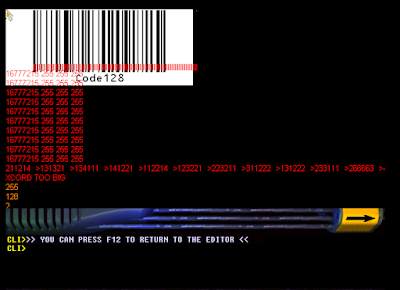

I load the bitmap and then just display the bar widths and manually look it up in the table at https://en.wikipedia.org/wiki/Code_128.
Quick and dirty but so much easier than trying to count pixels by hand...


So why only 107 symbols in Code 128?
Sometimes you just wonder why things have a certain number of possibilities. Like code 128 barcodes. Why does it have a certain # of symbols?
From https://en.wikipedia.org/wiki/Code_128
It's got a constant 11 bit width with 3 bars and 3 spaces. Each bar can be from 1 to 4 units thick.
So you have 6 bars and they can have 4 possibilities each.
You'd think it would be 4 * 4 * 4 * 4 * 4 = 4096 possibilities, but the number of units all has to add up to 11.
Let's write some javascript to do some counting for us:
and it dutifully gives us 216 possibilities.
If we remove half of those 216 taking away the reverse bit patterns, we get 108 which is pretty close to the 107 symbols that you can have in code 128.
From https://en.wikipedia.org/wiki/Code_128
It's got a constant 11 bit width with 3 bars and 3 spaces. Each bar can be from 1 to 4 units thick.
So you have 6 bars and they can have 4 possibilities each.
You'd think it would be 4 * 4 * 4 * 4 * 4 = 4096 possibilities, but the number of units all has to add up to 11.
Let's write some javascript to do some counting for us:
and it dutifully gives us 216 possibilities.
If we remove half of those 216 taking away the reverse bit patterns, we get 108 which is pretty close to the 107 symbols that you can have in code 128.
Friday, August 31, 2018
darkbasic classic and warrenview
Years ago, there was this cool program called warrenview which would display pictures as a 3d plane that you could rotate around. I had a cd of darkbasic classic and decided to install it and start fiddling around. It's very idiosyncratic but it's fast and fun and a bit addictive to try things out and see what happens. I remember the old Amiga AMOS Basic and DarkBasic Classic (DBC) reminds me of it. It can be fiddly to get things working but it doesn't seem to crash.
DBC is a bit archaic (the built in editor is 640x480 even if you have a full HD monitor). PRINT doesn't scroll the screen when you hit the bottom of the screen or use a monospace font. Once you activate the 3d system it will tend to overwrite everything on the screen unless you disable the background with BACKDROP OFF. You can set things but not retrieve the same state, like SCALE TEXTURE. It's a one way street with write only and you have to remember what you set it to.
If you want to write text to the screen, the automatic refreshing system will overwrite it unless you refresh it every 60th of a second even when you use SYNC ON and SYNC. Putting in a WAIT 5000 or SLEEP 5000 will have the text disappear within the next 60th of a second.
Why do comments have to start with a backtick? Why not a single quote like QBASIC? (That one is hardwired, man! Must unlearn...)
And my personal favorite, when the editor is running (just editing your program, not running a program), cpu usage is 100%. (Why Lisa, why?)
Anyway, here's my attempt at recreating warrenview in DBC. There's something really satisfying about spinning the picture with the mouse at 60 fps.

DBC is a bit archaic (the built in editor is 640x480 even if you have a full HD monitor). PRINT doesn't scroll the screen when you hit the bottom of the screen or use a monospace font. Once you activate the 3d system it will tend to overwrite everything on the screen unless you disable the background with BACKDROP OFF. You can set things but not retrieve the same state, like SCALE TEXTURE. It's a one way street with write only and you have to remember what you set it to.
If you want to write text to the screen, the automatic refreshing system will overwrite it unless you refresh it every 60th of a second even when you use SYNC ON and SYNC. Putting in a WAIT 5000 or SLEEP 5000 will have the text disappear within the next 60th of a second.
Why do comments have to start with a backtick? Why not a single quote like QBASIC? (That one is hardwired, man! Must unlearn...)
And my personal favorite, when the editor is running (just editing your program, not running a program), cpu usage is 100%. (Why Lisa, why?)
Anyway, here's my attempt at recreating warrenview in DBC. There's something really satisfying about spinning the picture with the mouse at 60 fps.

Tuesday, July 3, 2018
Code 39 intercharacter gap
I was fiddling with my barcode scanner and an old UPS barcode.
It was obviously code 39 but when I made my own version of it using one of the online web barcode generators, the bars didn't look the same. The pattern was very similar but subtly different.
What I discovered is that the intercharacter gap is wide instead of narrow. According to https://en.wikipedia.org/wiki/Code_39, "Characters are separated by an additional narrow space."
I wonder if a larger intercharacter gap made it easier to decode years ago.
So here's the original barcode with a freshly generated version underneath for comparison.

It was obviously code 39 but when I made my own version of it using one of the online web barcode generators, the bars didn't look the same. The pattern was very similar but subtly different.
What I discovered is that the intercharacter gap is wide instead of narrow. According to https://en.wikipedia.org/wiki/Code_39, "Characters are separated by an additional narrow space."
I wonder if a larger intercharacter gap made it easier to decode years ago.
So here's the original barcode with a freshly generated version underneath for comparison.

Saturday, June 16, 2018
xrandr: why not just have --setcvtmode 1920x1080@60
I have fiddled with xrandr a lot and I wish that it'd be easier to just specify a resolution and refresh rate in one line.
Something like
xrandr --output VGA-1 --setcvtmode 1920x1080@60
instead of having to do:
$ cvt 1920 1080 60
# 1920x1080 59.96 Hz (CVT 2.07M9) hsync: 67.16 kHz; pclk: 173.00 MHz
Modeline "1920x1080_60.00" 173.00 1920 2048 2248 2576 1080 1083 1088 1120 -hsync +vsync
then copying and pasting the modeline into xrandr --newmode
$ xrandr --newmode "1920x1080_60.00" 173.00 1920 2048 2248 2576 1080 1083 1088 1120 -hsync +vsync
and then adding the mode to the VGA-1
$ xrandr --addmode VGA-1 "1920x1080_60.00"
and then finally actually setting the mode
$ xrandr --output VGA-1 --mode "1920x1080_60.00"
You can do things like use awk:
xrandr --newmode `cvt 1920 1080 60 | awk 'NR==2 {for (i=2;i<=NF;i++) printf("%s ",$i);}'`
xrandr --addmode VGA-1 `cvt 1920 1080 60 | awk 'NR==2 {for (i=2;i<=2;i++) printf("%s ",$i);}'`
but why not have it all in a single command, and maybe have an option for trying it out and reverting to the previous settings in 10 seconds, in case your monitor doesn't like it.
something like:
xrandr --output VGA-1 --setcvtmode 1920x1080@60 --trymode 10
That would make it much less cumbersome. Why does it have to be hard?
Something like
xrandr --output VGA-1 --setcvtmode 1920x1080@60
instead of having to do:
$ cvt 1920 1080 60
# 1920x1080 59.96 Hz (CVT 2.07M9) hsync: 67.16 kHz; pclk: 173.00 MHz
Modeline "1920x1080_60.00" 173.00 1920 2048 2248 2576 1080 1083 1088 1120 -hsync +vsync
then copying and pasting the modeline into xrandr --newmode
$ xrandr --newmode "1920x1080_60.00" 173.00 1920 2048 2248 2576 1080 1083 1088 1120 -hsync +vsync
and then adding the mode to the VGA-1
$ xrandr --addmode VGA-1 "1920x1080_60.00"
and then finally actually setting the mode
$ xrandr --output VGA-1 --mode "1920x1080_60.00"
You can do things like use awk:
xrandr --newmode `cvt 1920 1080 60 | awk 'NR==2 {for (i=2;i<=NF;i++) printf("%s ",$i);}'`
xrandr --addmode VGA-1 `cvt 1920 1080 60 | awk 'NR==2 {for (i=2;i<=2;i++) printf("%s ",$i);}'`
but why not have it all in a single command, and maybe have an option for trying it out and reverting to the previous settings in 10 seconds, in case your monitor doesn't like it.
something like:
xrandr --output VGA-1 --setcvtmode 1920x1080@60 --trymode 10
That would make it much less cumbersome. Why does it have to be hard?
Thursday, June 14, 2018
Mysterious unscannable barcode on my service tag
So I was fiddling with my barcode scanner and was scanning the barcode of my Dell Service Tag. There were actually two barcodes on the tag, one that would scan that was Code 128, and the other that would not.
I did some detective work and figured out the one that wouldn't scan must be Interleaved Code 2 of 5.
From the wikipedia page at https://en.wikipedia.org/wiki/Interleaved_2_of_5 I figured out how to manually decode it. It's actually pretty simple once you know that it encodes pairs of numbers, the widths of the black bars being the first number and the widths of the gaps being the second number.
Interleaved 2 of 5 has a start code of nnnn and stop code of Wnn which makes it a bit easier to spot now that I know what I'm looking for.
So for example the I2of5 barcode on my Optiplex 745 Desktop was "0019". Plugging that number into my Brother P-touch software and selecting I2of5 makes the exact same barcode.
But why wouldn't it scan?
I found a manual for my Symbol Spark and looked at its configuration barcodes, and enabled the I2of5 but it still wouldn't scan.
So I scanned the MIN Length I2of5 and then 0 and 0. (The Symbol Spark expects two digits when you scan the configuration barcodes and I was baffled why it wasn't working because I was only scanning a single number).
Now that I've got it configured correctly, the barcode scanner would scan those previously "invisible" barcodes.
I did some detective work and figured out the one that wouldn't scan must be Interleaved Code 2 of 5.
From the wikipedia page at https://en.wikipedia.org/wiki/Interleaved_2_of_5 I figured out how to manually decode it. It's actually pretty simple once you know that it encodes pairs of numbers, the widths of the black bars being the first number and the widths of the gaps being the second number.
Interleaved 2 of 5 has a start code of nnnn and stop code of Wnn which makes it a bit easier to spot now that I know what I'm looking for.
So for example the I2of5 barcode on my Optiplex 745 Desktop was "0019". Plugging that number into my Brother P-touch software and selecting I2of5 makes the exact same barcode.
But why wouldn't it scan?
I found a manual for my Symbol Spark and looked at its configuration barcodes, and enabled the I2of5 but it still wouldn't scan.
So I scanned the MIN Length I2of5 and then 0 and 0. (The Symbol Spark expects two digits when you scan the configuration barcodes and I was baffled why it wasn't working because I was only scanning a single number).
Now that I've got it configured correctly, the barcode scanner would scan those previously "invisible" barcodes.
Subscribe to:
Posts (Atom)