I got my hands on a targus docking station that's USB 3.0 and I thought I'd give it a go with Ubuntu 14.04. Since I installed the drivers from displaylink already, it was detected upon first plug in and works great. What's cool is that it supports dual monitors, both DVI and HDMI. Nice. Now if my Optiplex 760 supported USB 3.0 I would really be flying, but it's only USB 2.0.
I still get a few odd quirks with the displaylink thing, like my Toshiba TV on the HDMI disappeared and I had to fiddle to get it to come back up. Having 4 monitors, 2 on the integrated graphics, and 2 on the targus acp70usz is awesome. I think that multimonitor on linux is like the Holy Grail, especially anything more than dual monitors.
edit: I tried it out with another hdmi device, and it's running fine for about 10 minutes with firefox, then boom the screen goes blank. The system doesn't crash, it just goes blank. Weird.
http://targus.com/form/download.aspx?region=7&sku=ACP70USZ
Monday, February 29, 2016

Sunday, February 28, 2016
This would be awesome on the nose of my car
http://www.scallopimaging.com/products/d7-180-camera/
My most hated move in driving is having to pull out onto a busy street when there are cars parked and you can't see the cross traffic. If you had something like this on the front of your car, you could see both directions by just sticking the nose out.
If you had one on the tail of your car, backing up would be safer too.
My most hated move in driving is having to pull out onto a busy street when there are cars parked and you can't see the cross traffic. If you had something like this on the front of your car, you could see both directions by just sticking the nose out.
If you had one on the tail of your car, backing up would be safer too.
Saturday, February 27, 2016
Memory Upgrade weirdness
So I've been suffering with only 2GB on my optiplex 760 so I thought I'd upgrade it. I got 2x2GB corsair and plugged it into the open slots. It's supposed to support 8GB maximum so it should be able to handle this memory just fine.
Only it won't boot, chirp chirp chirp.
I took out 1 stick of the new memory and it booted fine.
So I put the other stick in and now it booted. Weird.
After running a memory diagnostic with memtest86 everything seemed fine. Now to run ubuntu. But I get graphical corruption, due to an "odd" memory size.
http://askubuntu.com/questions/527564/why-am-i-experiencing-visual-corruption-with-intel-x4500-graphics-card-on-14-04
I looked in the bios and it said that I was in "flex mode", not dual channel mode. The memory sticks are in the wrong slot combination for dual channel mode (there's only so many ways to put 4 sticks into 4 slots and I've got it backwards). Rearranging the sticks makes the computer not boot again.
I gave up on it after the umpteenth "unplug/swap memory/plug back in" cycle so now I'm running just the 2x2GB new sticks which is still an improvement.
More memory, less thrashing, tastes great, less filling.
Only it won't boot, chirp chirp chirp.
I took out 1 stick of the new memory and it booted fine.
So I put the other stick in and now it booted. Weird.
After running a memory diagnostic with memtest86 everything seemed fine. Now to run ubuntu. But I get graphical corruption, due to an "odd" memory size.
http://askubuntu.com/questions/527564/why-am-i-experiencing-visual-corruption-with-intel-x4500-graphics-card-on-14-04
I looked in the bios and it said that I was in "flex mode", not dual channel mode. The memory sticks are in the wrong slot combination for dual channel mode (there's only so many ways to put 4 sticks into 4 slots and I've got it backwards). Rearranging the sticks makes the computer not boot again.
I gave up on it after the umpteenth "unplug/swap memory/plug back in" cycle so now I'm running just the 2x2GB new sticks which is still an improvement.
More memory, less thrashing, tastes great, less filling.
Thursday, February 25, 2016
An ugly hack but it seems to work for wpdata watchpoint reads
So I added this to device_debug::watchpoint_check()
if (type & WATCHPOINT_READ)
global->wpdata = debug_read_memory(space,address,1,false);
//UINT64 debug_read_memory(address_space &space, offs_t address, int size, int apply_translation)
I'm not sure what the values should be to properly pass to debug_read_memory but this seems to work for my purposes.
It's an ugly hack to be sure...
WP 9800,200,r,1,{tracelog " READ addr=%x data=%x \n", wpaddr,wpdata;g}
WP 9800,200,w,1,{tracelog " WRITE addr=%x data=%x \n", wpaddr,wpdata;g}
trace >>mytrace3.txt,0,{tracelog "A=%02X EA=%04X HL=%04X DE=%04X BC=%04X SKIP=%1X 9937=%02X | ",a,ea,hl,de,bc,(psw&0x20)!=0,pb@9937}
gives me this trace:
A=20 EA=0FFE HL=7CAC DE=0000 BC=00C7 SKIP=0 9937=76 | 7AC4: ONIW VV:0F,$18
READ addr=980F data=80
A=20 EA=0FFE HL=7CAC DE=0000 BC=00C7 SKIP=0 9937=76 | 7AC7: RET
A=20 EA=0FFE HL=7CAC DE=0000 BC=00C7 SKIP=0 9937=76 | 7A2B: CALL $7A99
A=20 EA=0FFE HL=7CAC DE=0000 BC=00C7 SKIP=0 9937=76 | 7A99: OFFIW VV:0F,$69
READ addr=980F data=80
A=20 EA=0FFE HL=7CAC DE=0000 BC=00C7 SKIP=1 9937=76 | 7A9C: RET
A=20 EA=0FFE HL=7CAC DE=0000 BC=00C7 SKIP=0 9937=76 | 7A9D: CALL $7B1D
A=20 EA=0FFE HL=7CAC DE=0000 BC=00C7 SKIP=0 9937=76 | 7B1D: LXI HL,$9949
A=20 EA=0FFE HL=9949 DE=0000 BC=00C7 SKIP=0 9937=76 | 7B20: CALT ($00BE)
A=20 EA=0FFE HL=9949 DE=0000 BC=00C7 SKIP=0 9937=76 | 0041: LDEAX (HL)
READ addr=9949 data=38
READ addr=994A data=0
A=20 EA=0038 HL=9949 DE=0000 BC=00C7 SKIP=0 9937=76 | 0043: DCX EA
A=20 EA=0037 HL=9949 DE=0000 BC=00C7 SKIP=0 9937=76 | 0044: STEAX (HL)
WRITE addr=9949 data=37
WRITE addr=994A data=0
A=20 EA=0037 HL=9949 DE=0000 BC=00C7 SKIP=0 9937=76 | 0046: RET
A=20 EA=0037 HL=9949 DE=0000 BC=00C7 SKIP=0 9937=76 | 7B21: BIT 7,VV:00
READ addr=9800 data=5
that looks much better.
Where does wpdata get set in debugcpu
Hmmmm. Perusing emu/debug/debugcpu.cpp we find the elusive wpdata.
struct debugcpu_private
{
...
UINT64 wpdata;
UINT64 wpaddr;
UINT64 tempvar[NUM_TEMP_VARIABLES];
osd_ticks_t last_periodic_update_time;
bool comments_loaded;
};
//-------------------------------------------------
// watchpoint_check - check the watchpoints
// for a given CPU and address space
//-------------------------------------------------
void device_debug::watchpoint_check(address_space &space, int type, offs_t address, UINT64 value_to_write, UINT64 mem_mask)
...
// if we are a write watchpoint, stash the value that will be written
global->wpaddr = address;
if (type & WATCHPOINT_WRITE)
global->wpdata = value_to_write;
...
but there's no corresponding code to modify global->wpdata for WATCHPOINT_READ for just reading values so it doesn't get updated for reads.
struct debugcpu_private
{
...
UINT64 wpdata;
UINT64 wpaddr;
UINT64 tempvar[NUM_TEMP_VARIABLES];
osd_ticks_t last_periodic_update_time;
bool comments_loaded;
};
//-------------------------------------------------
// watchpoint_check - check the watchpoints
// for a given CPU and address space
//-------------------------------------------------
void device_debug::watchpoint_check(address_space &space, int type, offs_t address, UINT64 value_to_write, UINT64 mem_mask)
...
// if we are a write watchpoint, stash the value that will be written
global->wpaddr = address;
if (type & WATCHPOINT_WRITE)
global->wpdata = value_to_write;
...
but there's no corresponding code to modify global->wpdata for WATCHPOINT_READ for just reading values so it doesn't get updated for reads.
Watchpoint data reads don't seem to display the right data for wpdata
I thought I'd add some "memory snooping" to my trace to see what is read and written and upon close inspection the wpdata doesn't seem to display correctly.
WP 9800,200,rw,1,{tracelog " addr=%x data=%x ", wpaddr,wpdata;g}
trace >>mytrace.txt,0,{tracelog "A=%02X EA=%04X HL=%04X DE=%04X BC=%04X SKIP=%1X 9937=%02X | ",a,ea,hl,de,bc,(psw&0x20)!=0,pb@9937}
which generates this:
A=68 EA=0078 HL=2D00 DE=8007 BC=0080 SKIP=0 9937=76 | 221B: CALL $2205
A=68 EA=0078 HL=2D00 DE=8007 BC=0080 SKIP=0 9937=76 | 2205: LBCD $9939
addr=9939 data=1E addr=993A data=1E
A=68 EA=0078 HL=2D00 DE=8007 BC=9A79 SKIP=0 9937=76 | 2209: LXI EA,$9DA9
A=68 EA=9DA9 HL=2D00 DE=8007 BC=9A79 SKIP=0 9937=76 | 220C: DGT EA,BC
A=68 EA=9DA9 HL=2D00 DE=8007 BC=9A79 SKIP=1 9937=76 | 220E: RET
A=68 EA=9DA9 HL=2D00 DE=8007 BC=9A79 SKIP=0 9937=76 | 220F: RETS
A=68 EA=9DA9 HL=2D00 DE=8007 BC=9A79 SKIP=1 9937=76 | 221E: CALT ($0096)
A=68 EA=9DA9 HL=2D00 DE=8007 BC=9A79 SKIP=0 9937=76 | 221F: ANIW VV:03,$7F
addr=9803 data=1E addr=9803 data=8
A=68 EA=9DA9 HL=2D00 DE=8007 BC=9A79 SKIP=0 9937=76 | 2222: LXI HL,$9901
A=68 EA=9DA9 HL=9901 DE=8007 BC=9A79 SKIP=0 9937=76 | 2225: LDEAX (HL)
addr=9901 data=8 addr=9902 data=8
A=68 EA=0000 HL=9901 DE=8007 BC=9A79 SKIP=0 9937=76 | 2227: LDED $993B
addr=993B data=8 addr=993C data=8
A=68 EA=0000 HL=9901 DE=0078 BC=9A79 SKIP=0 9937=76 | 222B: DADD EA,DE
A=68 EA=0078 HL=9901 DE=0078 BC=9A79 SKIP=0 9937=76 | 222D: STEAX (HL)
addr=9901 data=78 addr=9902 data=0
A=68 EA=0078 HL=9901 DE=0078 BC=9A79 SKIP=0 9937=76 | 222F: OFFIW VV:09,$10
addr=9809 data=0
A=68 EA=0078 HL=9901 DE=0078 BC=9A79 SKIP=1 9937=76 | 2232: ORIW VV:11,$10
A=68 EA=0078 HL=9901 DE=0078 BC=9A79 SKIP=0 9937=76 | 2235: OFFIW VV:08,$20
addr=9808 data=0
A=68 EA=0078 HL=9901 DE=0078 BC=9A79 SKIP=1 9937=76 | 2238: ORIW VV:11,$08
A=68 EA=0078 HL=9901 DE=0078 BC=9A79 SKIP=0 9937=76 | 223B: LXI HL,$9808
A=68 EA=0078 HL=9808 DE=0078 BC=9A79 SKIP=0 9937=76 | 223E: LDEAX (HL)
if you look at the 221F: ANIW VV:03,$7F the first one should be the read, 9803 data=1E, AND with $7F then ends up writing 9803 data=8.
That can't be right. It looks like the wpdata doesn't get updated for a read, instead displaying the wpdata for the last value that was written.
LDED $9938 loads DE=0078 but it wpdata says it read the values 8 and 8.
WP 9800,200,rw,1,{tracelog " addr=%x data=%x ", wpaddr,wpdata;g}
trace >>mytrace.txt,0,{tracelog "A=%02X EA=%04X HL=%04X DE=%04X BC=%04X SKIP=%1X 9937=%02X | ",a,ea,hl,de,bc,(psw&0x20)!=0,pb@9937}
which generates this:
A=68 EA=0078 HL=2D00 DE=8007 BC=0080 SKIP=0 9937=76 | 221B: CALL $2205
A=68 EA=0078 HL=2D00 DE=8007 BC=0080 SKIP=0 9937=76 | 2205: LBCD $9939
addr=9939 data=1E addr=993A data=1E
A=68 EA=0078 HL=2D00 DE=8007 BC=9A79 SKIP=0 9937=76 | 2209: LXI EA,$9DA9
A=68 EA=9DA9 HL=2D00 DE=8007 BC=9A79 SKIP=0 9937=76 | 220C: DGT EA,BC
A=68 EA=9DA9 HL=2D00 DE=8007 BC=9A79 SKIP=1 9937=76 | 220E: RET
A=68 EA=9DA9 HL=2D00 DE=8007 BC=9A79 SKIP=0 9937=76 | 220F: RETS
A=68 EA=9DA9 HL=2D00 DE=8007 BC=9A79 SKIP=1 9937=76 | 221E: CALT ($0096)
A=68 EA=9DA9 HL=2D00 DE=8007 BC=9A79 SKIP=0 9937=76 | 221F: ANIW VV:03,$7F
addr=9803 data=1E addr=9803 data=8
A=68 EA=9DA9 HL=2D00 DE=8007 BC=9A79 SKIP=0 9937=76 | 2222: LXI HL,$9901
A=68 EA=9DA9 HL=9901 DE=8007 BC=9A79 SKIP=0 9937=76 | 2225: LDEAX (HL)
addr=9901 data=8 addr=9902 data=8
A=68 EA=0000 HL=9901 DE=8007 BC=9A79 SKIP=0 9937=76 | 2227: LDED $993B
addr=993B data=8 addr=993C data=8
A=68 EA=0000 HL=9901 DE=0078 BC=9A79 SKIP=0 9937=76 | 222B: DADD EA,DE
A=68 EA=0078 HL=9901 DE=0078 BC=9A79 SKIP=0 9937=76 | 222D: STEAX (HL)
addr=9901 data=78 addr=9902 data=0
A=68 EA=0078 HL=9901 DE=0078 BC=9A79 SKIP=0 9937=76 | 222F: OFFIW VV:09,$10
addr=9809 data=0
A=68 EA=0078 HL=9901 DE=0078 BC=9A79 SKIP=1 9937=76 | 2232: ORIW VV:11,$10
A=68 EA=0078 HL=9901 DE=0078 BC=9A79 SKIP=0 9937=76 | 2235: OFFIW VV:08,$20
addr=9808 data=0
A=68 EA=0078 HL=9901 DE=0078 BC=9A79 SKIP=1 9937=76 | 2238: ORIW VV:11,$08
A=68 EA=0078 HL=9901 DE=0078 BC=9A79 SKIP=0 9937=76 | 223B: LXI HL,$9808
A=68 EA=0078 HL=9808 DE=0078 BC=9A79 SKIP=0 9937=76 | 223E: LDEAX (HL)
if you look at the 221F: ANIW VV:03,$7F the first one should be the read, 9803 data=1E, AND with $7F then ends up writing 9803 data=8.
That can't be right. It looks like the wpdata doesn't get updated for a read, instead displaying the wpdata for the last value that was written.
LDED $9938 loads DE=0078 but it wpdata says it read the values 8 and 8.
Tuesday, February 23, 2016
click selects all in firefox with ubuntu
I use firefox under ubuntu and windows and one thing that is different is that a single click in the Location (URL) bar will select everything in windows, but the linux version will require a doubleclick.
So a little searching brought up this page:
http://www.askvg.com/hack-single-click-select-all-feature-in-mozilla-firefox-addressbar/
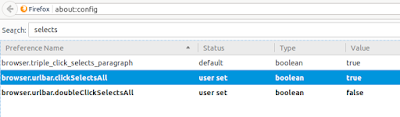
Bringing up about:config searching on "selects", a couple of right click and "toggle"s
and harmony in the universe is restored.
So a little searching brought up this page:
http://www.askvg.com/hack-single-click-select-all-feature-in-mozilla-firefox-addressbar/
Bringing up about:config searching on "selects", a couple of right click and "toggle"s
and harmony in the universe is restored.

Subscribe to:
Posts (Atom)