I got this cool Dune BD Prime 3.0 combo blu-ray disc and media player without a remote but I got it to work with a USB wireless keyboard.
Here's a list of what I could get to work:
while the player is running:
vol +/- and mute buttons work
ff, rew work
arrow keys and enter
A B C D =f9 f10 f11 f12
select = insert or f4
number keys = track number (type them quickly for a two digit number)
end = return to menu
A = audio sync
D = subtitle on/off (doesn't work unless you first activate subtitles)
menu key on keyboard works to bring up menu (the context menu key next to the right control key)
f5,f6 = angle
f3 = goto time
scroll lock = deinterlace settings
double hit of delete key acts as though you reloaded the disc
ESC = drop out of menu
f1 = info
pause = pause
music button = audio track
I wish every media player would work with a usb keyboard.
It'd also be great if they could add a few more keystrokes to make it more functional and ergonomic, like greater than and less than could do 2x/4x/8x forward/reverse play, s could cycle through available subtitles, spacebar could be play/pause, etc. Just a few additional keystrokes would make a huge difference in usability.
Tuesday, November 13, 2018

Monday, November 12, 2018
Trying out 4096x2160 resolution
I thought I'd run a "sudo get-edid | parse-edid" and see what my 4k tv actually says:
Note that it says maximum pixel clock is 300mhz since I'm connecting to one of the HDMI ports that maxes out at 4k@30hz.
sudo get-edid -b 5 | parse-edid
5
This is read-edid version 3.0.2. Prepare for some fun.
Attempting to use i2c interface
Only trying 5 as per your request.
256-byte EDID successfully retrieved from i2c bus 5
Looks like i2c was successful. Have a good day.
Checksum Correct
Section "Monitor"
Identifier "D50u-D1"
ModelName "D50u-D1"
VendorName "VIZ"
# Monitor Manufactured week 0 of 2015
# EDID version 1.3
# Digital Display
DisplaySize 1100 620
Gamma 2.20
Option "DPMS" "true"
Horizsync 15-80
VertRefresh 25-76
# Maximum pixel clock is 300MHz
#Not giving standard mode: 1920x1080, 60Hz
#Extension block found. Parsing...
#WARNING: I may have missed a mode (CEA mode 93)
#WARNING: I may have missed a mode (CEA mode 98)
#WARNING: I may have missed a mode (CEA mode 95)
#WARNING: I may have missed a mode (CEA mode 100)
Modeline "Mode 11" 148.50 1920 2008 2052 2200 1080 1084 1089 1125 +hsync +vsync
Modeline "Mode 0" 297.00 3840 4016 4104 4400 2160 2168 2178 2250 +hsync +vsync
Modeline "Mode 1" 148.50 1920 2008 2052 2200 1080 1084 1089 1125 +hsync +vsync
Modeline "Mode 2" 25.200 640 656 752 800 480 490 492 525 -hsync -vsync
Modeline "Mode 3" 27.027 1440 1478 1602 1716 480 484 487 525 -hsync -vsync interlace
Modeline "Mode 4" 27.027 1440 1478 1602 1716 480 484 487 525 -hsync -vsync interlace
Modeline "Mode 5" 27.027 720 736 798 858 480 489 495 525 -hsync -vsync
Modeline "Mode 6" 27.027 720 736 798 858 480 489 495 525 -hsync -vsync
Modeline "Mode 7" 74.250 1920 2008 2052 2200 1080 1082 1087 1125 +hsync +vsync interlace
Modeline "Mode 8" 148.500 1920 2008 2052 2200 1080 1084 1089 1125 +hsync +vsync
Modeline "Mode 9" 74.250 1280 1390 1420 1650 720 725 730 750 +hsync +vsync
Modeline "Mode 10" 74.250 1920 2558 2602 2750 1080 1084 1089 1125 +hsync +vsync
Modeline "Mode 12" 74.25 1280 1390 1430 1650 720 725 730 750 +hsync +vsync
Option "PreferredMode" "Mode 11"
EndSection
and I wondered what the CEA modes meant:
https://en.wikipedia.org/wiki/Extended_Display_Identification_Data
has a nice table that says that mode 100 is 4096x2160@24 for CEA mode 98.
So let's see if we can set that up.
I downloaded cvt.zip from riscosports.co.uk and compiled it with:
gcc cvt.c -o cvt -lm
and then used it to get a modeline for 4096x2160@24
./cvt
Description: This program generates video timing descriptions using formulas
from the VESA "CVT" (Coordinated Video Timing) v1.1 specification, based
itself on the earlier VESA "GTF" (Generalized Timing Formula) v1.0
specification.
usage: ./cvt x y refresh [-v|--verbose]
[-r|--reduced-blank] [-i|--interlaced]
[-f|--fbmode] [-s]|--romode] [-x|-xf86mode]
x : the desired horizontal resolution (required)
y : the desired vertical resolution (required)
refresh : the desired refresh rate (required)
-v|--verbose : enable verbose printouts (traces each step of the computation)
-r|--reduced-blank : use "Reduced Blanking" timings
-i|--interlaced : generate an Interlaced video mode
-f|--fbmode : output an fbset(8)-style mode description
-s|--romode : output an riscos-style mode description (this is the default
if no mode description is requested)
-x|-xf86mode : output an XFree86-style mode description
./cvt 4096 2160 24 -r -x
# 4096x2160 @ 24.00 Hz Reduced Blank (CVT)
# field rate 23.98 Hz; hsync: 52.40 kHz; pclk: 223.00 MHz
Modeline "4096x2160_24.00_rb" 223.00 4096 4144 4176 4256 2160 2163 2173 2185 +HSync -Vsync
xrandr --newmode "4096x2160_24.00_rb" 223.00 4096 4144 4176 4256 2160 2163 2173 2185 +HSync -Vsync
xrandr --addmode HDMI-1 "4096x2160_24.00_rb"
xrandr --output HDMI-1 --mode "4096x2160_24.00_rb"
and it works, the only thing I notice is that there is one vertical pixel line that seems a little weird in the middle, repeating a couple of pixels otherwise it looks great.. The native resolution of the TV is 3840x2160 so I would expect a few lines to be dropped.
Here's a bunch of reduced blank cvt modelines for different hz values so I don't have to fire up cvt again if I want to do a little experimenting.
Note that it says maximum pixel clock is 300mhz since I'm connecting to one of the HDMI ports that maxes out at 4k@30hz.
sudo get-edid -b 5 | parse-edid
5
This is read-edid version 3.0.2. Prepare for some fun.
Attempting to use i2c interface
Only trying 5 as per your request.
256-byte EDID successfully retrieved from i2c bus 5
Looks like i2c was successful. Have a good day.
Checksum Correct
Section "Monitor"
Identifier "D50u-D1"
ModelName "D50u-D1"
VendorName "VIZ"
# Monitor Manufactured week 0 of 2015
# EDID version 1.3
# Digital Display
DisplaySize 1100 620
Gamma 2.20
Option "DPMS" "true"
Horizsync 15-80
VertRefresh 25-76
# Maximum pixel clock is 300MHz
#Not giving standard mode: 1920x1080, 60Hz
#Extension block found. Parsing...
#WARNING: I may have missed a mode (CEA mode 93)
#WARNING: I may have missed a mode (CEA mode 98)
#WARNING: I may have missed a mode (CEA mode 95)
#WARNING: I may have missed a mode (CEA mode 100)
Modeline "Mode 11" 148.50 1920 2008 2052 2200 1080 1084 1089 1125 +hsync +vsync
Modeline "Mode 0" 297.00 3840 4016 4104 4400 2160 2168 2178 2250 +hsync +vsync
Modeline "Mode 1" 148.50 1920 2008 2052 2200 1080 1084 1089 1125 +hsync +vsync
Modeline "Mode 2" 25.200 640 656 752 800 480 490 492 525 -hsync -vsync
Modeline "Mode 3" 27.027 1440 1478 1602 1716 480 484 487 525 -hsync -vsync interlace
Modeline "Mode 4" 27.027 1440 1478 1602 1716 480 484 487 525 -hsync -vsync interlace
Modeline "Mode 5" 27.027 720 736 798 858 480 489 495 525 -hsync -vsync
Modeline "Mode 6" 27.027 720 736 798 858 480 489 495 525 -hsync -vsync
Modeline "Mode 7" 74.250 1920 2008 2052 2200 1080 1082 1087 1125 +hsync +vsync interlace
Modeline "Mode 8" 148.500 1920 2008 2052 2200 1080 1084 1089 1125 +hsync +vsync
Modeline "Mode 9" 74.250 1280 1390 1420 1650 720 725 730 750 +hsync +vsync
Modeline "Mode 10" 74.250 1920 2558 2602 2750 1080 1084 1089 1125 +hsync +vsync
Modeline "Mode 12" 74.25 1280 1390 1430 1650 720 725 730 750 +hsync +vsync
Option "PreferredMode" "Mode 11"
EndSection
and I wondered what the CEA modes meant:
https://en.wikipedia.org/wiki/Extended_Display_Identification_Data
has a nice table that says that mode 100 is 4096x2160@24 for CEA mode 98.
So let's see if we can set that up.
I downloaded cvt.zip from riscosports.co.uk and compiled it with:
gcc cvt.c -o cvt -lm
and then used it to get a modeline for 4096x2160@24
./cvt
Description: This program generates video timing descriptions using formulas
from the VESA "CVT" (Coordinated Video Timing) v1.1 specification, based
itself on the earlier VESA "GTF" (Generalized Timing Formula) v1.0
specification.
usage: ./cvt x y refresh [-v|--verbose]
[-r|--reduced-blank] [-i|--interlaced]
[-f|--fbmode] [-s]|--romode] [-x|-xf86mode]
x : the desired horizontal resolution (required)
y : the desired vertical resolution (required)
refresh : the desired refresh rate (required)
-v|--verbose : enable verbose printouts (traces each step of the computation)
-r|--reduced-blank : use "Reduced Blanking" timings
-i|--interlaced : generate an Interlaced video mode
-f|--fbmode : output an fbset(8)-style mode description
-s|--romode : output an riscos-style mode description (this is the default
if no mode description is requested)
-x|-xf86mode : output an XFree86-style mode description
./cvt 4096 2160 24 -r -x
# 4096x2160 @ 24.00 Hz Reduced Blank (CVT)
# field rate 23.98 Hz; hsync: 52.40 kHz; pclk: 223.00 MHz
Modeline "4096x2160_24.00_rb" 223.00 4096 4144 4176 4256 2160 2163 2173 2185 +HSync -Vsync
xrandr --newmode "4096x2160_24.00_rb" 223.00 4096 4144 4176 4256 2160 2163 2173 2185 +HSync -Vsync
xrandr --addmode HDMI-1 "4096x2160_24.00_rb"
xrandr --output HDMI-1 --mode "4096x2160_24.00_rb"
and it works, the only thing I notice is that there is one vertical pixel line that seems a little weird in the middle, repeating a couple of pixels otherwise it looks great.. The native resolution of the TV is 3840x2160 so I would expect a few lines to be dropped.
Here's a bunch of reduced blank cvt modelines for different hz values so I don't have to fire up cvt again if I want to do a little experimenting.
4k split screen clone test
Ok, so I can make a double tall scrolling screen, let's see if we can get a side by side clone view going.
I go into ccsm and make an output region that's 1920x2160 for the upper left quadrant, a 1920x2160 for the lower left quadrant, and a 1920x2160 for the upper right quadrant, then just use the compiz clone to clone the lower left quadrant into the upper right quadrant. Just Shift+WIN (super) click and drag on the lower left quad and drag up to the upper right.
I open my browser window and resize to fit and voila, I can see the upper left quad and lower left quad at the same time. Scrolling the webpage with the scroll wheel updates the clone as you'd expect.
The video drivers and compiz don't refresh the screen properly and it flickers sometimes, and there's some weird double/triple buffer jitter effects. It would be awesome if this were seamless.
It also helps to have a "regular" 1920x1080 monitor as your primary monitor on the left when you're messing around with additional screens.

So now you can view a double tall webpage in a "two page view".

A screenshot of the entire screen shows my regular 1920x1080 monitor area on the left, the left side 1920x4320 region and the upper right 1920x2160 region that is cloned from the lower half.

I go into ccsm and make an output region that's 1920x2160 for the upper left quadrant, a 1920x2160 for the lower left quadrant, and a 1920x2160 for the upper right quadrant, then just use the compiz clone to clone the lower left quadrant into the upper right quadrant. Just Shift+WIN (super) click and drag on the lower left quad and drag up to the upper right.
I open my browser window and resize to fit and voila, I can see the upper left quad and lower left quad at the same time. Scrolling the webpage with the scroll wheel updates the clone as you'd expect.
The video drivers and compiz don't refresh the screen properly and it flickers sometimes, and there's some weird double/triple buffer jitter effects. It would be awesome if this were seamless.
It also helps to have a "regular" 1920x1080 monitor as your primary monitor on the left when you're messing around with additional screens.

So now you can view a double tall webpage in a "two page view".

A screenshot of the entire screen shows my regular 1920x1080 monitor area on the left, the left side 1920x4320 region and the upper right 1920x2160 region that is cloned from the lower half.

Panning a double high 4k screen with xrandr
I wanted to see if I could make a double high 4k screen and pan up and down.
xrandr --output HDMI-1 --panning 3840x4320+1920+0 --fb $((1920+3840))x$((2160*2))
I've got a 1920x1080 regular HD monitor on the left and a 4k monitor on the right.
The screen size gives me 3840x4320 (double high 3840x2160) with an offset of +1920+0 to position it to the right of the 1920x1080 monitor.
Then we set the size of the framebuffer to 5760x4320 using bash to do a little math for us, but putting a math expression in between a dollar sign and double parenthesis $(( )).
After I execute this, xrandr reports these stats, I guess I could go up to a maximum 8192x8192 framebuffer size.
xrandr
Screen 0: minimum 320 x 200, current 5760 x 4320, maximum 8192 x 8192
VGA-1 connected primary 1920x1080+0+0 (normal left inverted right x axis y axis) 521mm x 293mm
1920x1080 60.00*+
...
HDMI-1 connected 3840x4320+1920+0 (normal left inverted right x axis y axis) 1096mm x 616mm panning 3840x4320+1920+0
1920x1080 60.00 59.94 24.00 23.98
1920x1080i 60.00 59.94
3840x2160_24.00_rb 24.00*
...
It's interesting to see the output lines in ccsm, they get updated to reflect the new size when detect outputs is checked.

https://sfxpt.wordpress.com/2011/02/02/panning-using-xrandr/
xrandr --output HDMI-1 --panning 3840x4320+1920+0 --fb $((1920+3840))x$((2160*2))
I've got a 1920x1080 regular HD monitor on the left and a 4k monitor on the right.
The screen size gives me 3840x4320 (double high 3840x2160) with an offset of +1920+0 to position it to the right of the 1920x1080 monitor.
Then we set the size of the framebuffer to 5760x4320 using bash to do a little math for us, but putting a math expression in between a dollar sign and double parenthesis $(( )).
After I execute this, xrandr reports these stats, I guess I could go up to a maximum 8192x8192 framebuffer size.
xrandr
Screen 0: minimum 320 x 200, current 5760 x 4320, maximum 8192 x 8192
VGA-1 connected primary 1920x1080+0+0 (normal left inverted right x axis y axis) 521mm x 293mm
1920x1080 60.00*+
...
HDMI-1 connected 3840x4320+1920+0 (normal left inverted right x axis y axis) 1096mm x 616mm panning 3840x4320+1920+0
1920x1080 60.00 59.94 24.00 23.98
1920x1080i 60.00 59.94
3840x2160_24.00_rb 24.00*
...
It's interesting to see the output lines in ccsm, they get updated to reflect the new size when detect outputs is checked.

https://sfxpt.wordpress.com/2011/02/02/panning-using-xrandr/
Saturday, November 10, 2018
Splitting the 4k tv into sections
So I was using a firefox web browser on ubuntu 18.04 displaying on the 4k tv and it seems that most webpages don't use all of the screen real estate, tending to have a narrow band in the middle.
I wish that I could divide the monitor into 2 or 3 columns with a long web page. It should theoretically be possible to "reconfigure" a regular 3840x2160 monitor into 2 strips of 1920x2160 so that it could "pretend" to be a really tall 1920x4320 monitor, displaying the 2 strips side by side instead of vertically. That would be a neat trick.
Unfortunately, I've only figured out how to divide the monitor space into "regions" with compiz.
It's still pretty cool though.
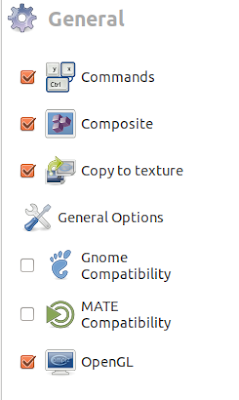
You instal compizconfig-settings-manager and launch it with ccsm.
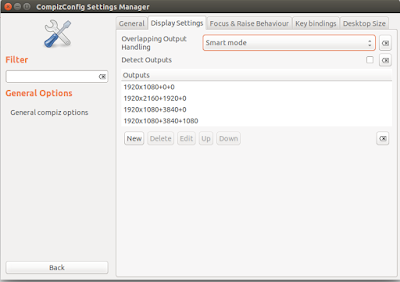
Click on General Options and go to Display Settings tab.
Then uncheck Detect Outputs and then modify the output lines.
I've got two monitors, one HD and one 4k monitor.
The first line is the left HD monitor, 1920x1080+0+0.
The second line is a vertical strip on the 4k monitor, 1920x2160+1920+0.
The third line is a 1920x1080 size block on the upper right side of the 4k monitor, 1920x1080+3840+0
The fourth line is a 1920x1080 size block on the lower right side of the 4k monitor, 1920x1080+3840+1080.
https://askubuntu.com/questions/1001444/virtual-split-screen-on-ubuntu
I also discovered the "Clone Output" compiz plugin which is pretty cool, I just install with "sudo apt install compiz-plugins-extra" and then run ccsm to enable the "Desktop/Clone Output" plugin, then use Shift+super+Button1 to activate (Shift+windows key) and click on the screen to clone and drag it to another screen. It works pretty well, resizing the window to fit the size of the other screen.
http://forum.compiz.org/viewtopic.php?t=123&f=114

Now if I could just make a super tall 1920x4320 virtual monitor and "clone" the top and bottom halves to the left and right halves of a 3840x2160 monitor.
I wish that I could divide the monitor into 2 or 3 columns with a long web page. It should theoretically be possible to "reconfigure" a regular 3840x2160 monitor into 2 strips of 1920x2160 so that it could "pretend" to be a really tall 1920x4320 monitor, displaying the 2 strips side by side instead of vertically. That would be a neat trick.
Unfortunately, I've only figured out how to divide the monitor space into "regions" with compiz.
It's still pretty cool though.
You instal compizconfig-settings-manager and launch it with ccsm.
Click on General Options and go to Display Settings tab.
Then uncheck Detect Outputs and then modify the output lines.
I've got two monitors, one HD and one 4k monitor.
The first line is the left HD monitor, 1920x1080+0+0.
The second line is a vertical strip on the 4k monitor, 1920x2160+1920+0.
The third line is a 1920x1080 size block on the upper right side of the 4k monitor, 1920x1080+3840+0
The fourth line is a 1920x1080 size block on the lower right side of the 4k monitor, 1920x1080+3840+1080.


https://askubuntu.com/questions/1001444/virtual-split-screen-on-ubuntu
I also discovered the "Clone Output" compiz plugin which is pretty cool, I just install with "sudo apt install compiz-plugins-extra" and then run ccsm to enable the "Desktop/Clone Output" plugin, then use Shift+super+Button1 to activate (Shift+windows key) and click on the screen to clone and drag it to another screen. It works pretty well, resizing the window to fit the size of the other screen.
http://forum.compiz.org/viewtopic.php?t=123&f=114

Now if I could just make a super tall 1920x4320 virtual monitor and "clone" the top and bottom halves to the left and right halves of a 3840x2160 monitor.
Thursday, November 8, 2018
Got a 4k tv but my integrated video can't make a 4k signal...or can it?
Well, I finally got a 4k tv, but now I've realized that no piece of computer equipment that I have will make a 4k resolution signal...
Or so I thought...
I read this page about going to 3840x2160 resolution with cvt and reduced blanking and thought I'd give the modeline a go:
https://superuser.com/questions/1323967/how-can-i-set-display-resolution-to-3840x2160-with-intel-graphics-3000/1323969#1323969
Also I found some interesting stuff at: https://medium.com/@ValdikSS/how-to-use-high-resolutions-with-older-hardware-58577d91b1f8
Using the modeline from 3840x2160 24 reduced blanking and it works!!!
xrandr --newmode "3840x2160_24.00_rb" 209.75 3840 3888 3920 4000 2160 2163 2168 2185 +HSync -Vsync
xrandr --addmode HDMI-1 "3840x2160_24.00_rb"
I can play youtube at 1440p, 2160p seems to tax my system too much, and it looks beautiful!
Xrandr says that it's an HDMI port but it's a DVI port on the back of the computer and I'm using a DVI to HDMI cable.
lspci says I have
00:02.0 VGA compatible controller: Intel Corporation Xeon E3-1200 v2/3rd Gen Core processor Graphics Controller (rev 09)
Ubuntu 18.04 says that I have a Intel® Core™ i3-3220 CPU @ 3.30GHz × 4 and my graphics are Intel® Ivybridge Desktop.
According to intel's website the i3-3220 has Intel® HD Graphics 2500.
I don't know exactly what the maximum pixel clock is for the HD Graphics 2500, but according to https://www.x.org/docs/intel/IVB/IHD_OS_Vol3_Part4.pdf Ivy Bridge it's limited to 225 mhz which is just above the 209.75 dot clock in the 3840x2160_24.00_rb modeline. I'll bet I could get 25 fps instead of 24 to fit just under 225 mhz. For now, it's totally stable so I'm really happy.

Or so I thought...
I read this page about going to 3840x2160 resolution with cvt and reduced blanking and thought I'd give the modeline a go:
https://superuser.com/questions/1323967/how-can-i-set-display-resolution-to-3840x2160-with-intel-graphics-3000/1323969#1323969
Also I found some interesting stuff at: https://medium.com/@ValdikSS/how-to-use-high-resolutions-with-older-hardware-58577d91b1f8
Using the modeline from 3840x2160 24 reduced blanking and it works!!!
xrandr --newmode "3840x2160_24.00_rb" 209.75 3840 3888 3920 4000 2160 2163 2168 2185 +HSync -Vsync
xrandr --addmode HDMI-1 "3840x2160_24.00_rb"
I can play youtube at 1440p, 2160p seems to tax my system too much, and it looks beautiful!
Xrandr says that it's an HDMI port but it's a DVI port on the back of the computer and I'm using a DVI to HDMI cable.
lspci says I have
00:02.0 VGA compatible controller: Intel Corporation Xeon E3-1200 v2/3rd Gen Core processor Graphics Controller (rev 09)
Ubuntu 18.04 says that I have a Intel® Core™ i3-3220 CPU @ 3.30GHz × 4 and my graphics are Intel® Ivybridge Desktop.
According to intel's website the i3-3220 has Intel® HD Graphics 2500.
I don't know exactly what the maximum pixel clock is for the HD Graphics 2500, but according to https://www.x.org/docs/intel/IVB/IHD_OS_Vol3_Part4.pdf Ivy Bridge it's limited to 225 mhz which is just above the 209.75 dot clock in the 3840x2160_24.00_rb modeline. I'll bet I could get 25 fps instead of 24 to fit just under 225 mhz. For now, it's totally stable so I'm really happy.

Wednesday, November 7, 2018
VBA subtleties
So I'm fiddling with VBA under an old version of Excel and I want to use the file system object.
First you have to "create" an fso with:
Once you do this you can start using ths filesystemobject.
We can get a folder reference like this:
and I've created a folder called TESTFOLDER that we can access in the same directory where I've put my excel file.
And let's try passing a folder variable to a subroutine.
and we can call it with
and we get a result like:
printed to the immediate window.
but what is the actual type? Is it a folder or a string? Let's print the typename too.
and lets call it with parentheses around myfol.
and we get this:
but why is it a string?
because I put the subroutine call in parentheses which converted it into a string.
Now let's try calling it without parentheses:
and we get
I'm so used to calling functions in other languages where you wrap the parameters in parentheses that I naturally put them in, but in this case, it converts the folder into a string.
Here's a quick test that you can type into the VBA immediate window:
Why does it convert it to a string? I think because the parentheses trigger a default conversion to Folder.Path. If you go to the Object Browser in VBA and find the Folder type and choose Path it will say in the description that Path is the default member of the Scripting.Folder object.
The other thing that I've got to remember is to use "SET" when dealing with objects.
fso=createobject("scripting.filesystem")
doesn't work.
You have to use the set keyword.
set fso=createobject("scripting.filesystem")
First you have to "create" an fso with:
set fso = createobject("Scripting.FileSystemObject")Once you do this you can start using ths filesystemobject.
We can get a folder reference like this:
set myfol = fso.GetFolder("TESTFOLDER")and I've created a folder called TESTFOLDER that we can access in the same directory where I've put my excel file.
And let's try passing a folder variable to a subroutine.
sub test_passing_folder(afolder)

debug.print afolder

end sub
and we can call it with
ThisWorkbook.test_passing_folder(myfol)
and we get a result like:
G:\TESTFOLDERprinted to the immediate window.
but what is the actual type? Is it a folder or a string? Let's print the typename too.
sub test_passing_folder(afolder)

debug.print afolder, typename(afolder)

end sub
and lets call it with parentheses around myfol.
set myfol = fso.GetFolder("TESTFOLDER")

thisworkbook.test_passing_folder(myfol)
and we get this:
G:\TESTFOLDER Stringbut why is it a string?
because I put the subroutine call in parentheses which converted it into a string.
Now let's try calling it without parentheses:
set myfol = fso.GetFolder("TESTFOLDER")

test_passing_folder myfol
and we get
G:\TESTFOLDER Folder
I'm so used to calling functions in other languages where you wrap the parameters in parentheses that I naturally put them in, but in this case, it converts the folder into a string.
Here's a quick test that you can type into the VBA immediate window:
set fso=createoject("scripting.filesystemobject")

debug.print typename(fso)

FileSystemObject


ThisWorkbook.test_passing_folder fso.GetFolder("TESTFOLDER")

G:\TESTFOLDER Folder


? typename(fso.getfolder("TESTFOLDER"))

Folder

? typename((fso.getfolder("TESTFOLDER")))

String
Why does it convert it to a string? I think because the parentheses trigger a default conversion to Folder.Path. If you go to the Object Browser in VBA and find the Folder type and choose Path it will say in the description that Path is the default member of the Scripting.Folder object.
The other thing that I've got to remember is to use "SET" when dealing with objects.
fso=createobject("scripting.filesystem")
doesn't work.
You have to use the set keyword.
set fso=createobject("scripting.filesystem")
Subscribe to:
Posts (Atom)